
dagshift
Upgrade Apache Airflow DAGs to any newer version, right inside VS Code.
2.x → 2.y · 2 → 3 · 3.x → 3.y · a diff before anything is written
What it does
-
Finds the version you run today
Reads requirements, constraints URLs, Dockerfiles, compose, Helm, Cloud Composer
image_version, MWAA and Astro Runtime. Infrastructure in a separate Terraform repository? Point at it. -
Upgrades to the version you pick
Any target from 2.7 to 3.3. Each target has its own rule set, measured on a real install of that Airflow release.
-
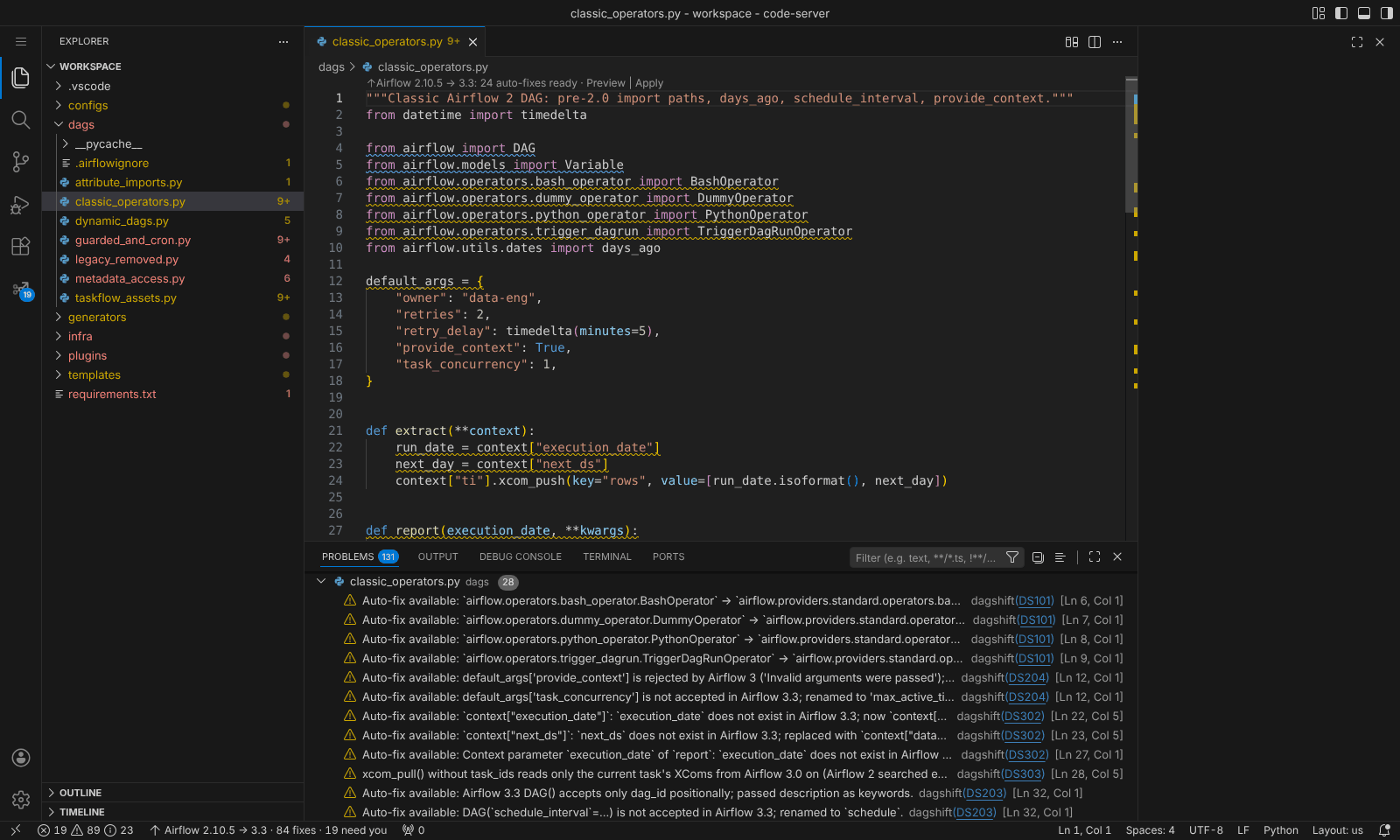
Fixes what is safe to fix
Import paths,
days_ago,schedule_interval, removed context variables, Datasets to Assets, operator arguments, templates inside strings and YAML. -
Explains the rest
Metadata database access, SubDAGs, Flask plugins and cron semantics come with a concrete recipe instead of a guess.
-
Diff first, always
Edit in place through VS Code's refactor preview, or write an upgraded copy next to the project and leave the originals untouched.
-
Proves the result loads
Loads your DAG folder with Airflow's own DagBag in an environment you choose, and reports import errors and deprecation warnings.
On real DAGs
The eight Cloud Composer DAGs in orchestration-reference, rendered and parsed with Airflow 3.3.1:
| DAGs that load | Import errors | |
|---|---|---|
| Original | 0 / 8 | 8 |
After ruff --select AIR3 --fix --unsafe-fixes |
0 / 8 | 8, then 4 once days_ago is fixed by hand |
| After dagshift | 8 / 8 | 0 |
More numbers, including Airflow's own example DAGs, are in How it works.
Works with every shape of Airflow project
Plain DAG files, TaskFlow, dynamic DAG generators, custom operators and plugins, Jinja-templated DAG factories, dag-factory and homegrown YAML/JSON pipelines, code generators that emit DAGs as strings, and the requirements, images and infrastructure files that pin Airflow.
Everything runs on your machine
The extension sends nothing anywhere. The only network access is a one-time pip install of the
engine's single dependency (libcst) from your configured package index.